What it looks like
One page. Paste, press, download.
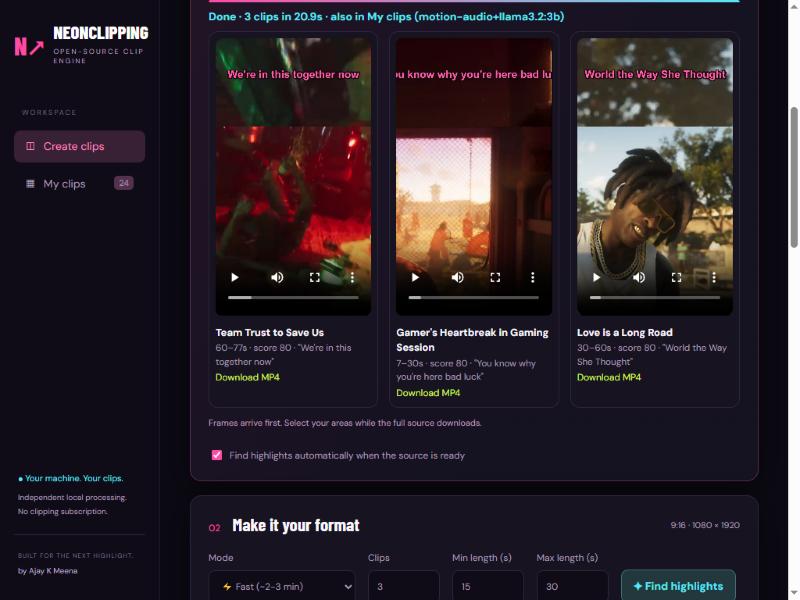
Paste a YouTube, Twitch or Kick link. Get captioned 9:16 clips in about two minutes. Hinglish captions, facecam layouts and live clipping included.
You do not need to know GitHub, Python or any code.
The setup file checks your PC, installs what is missing and opens NeonClipping in your browser. A shortcut appears on your Desktop.
YouTube, Twitch or Kick. Pick where the webcam is (or draw it). Press Make clips.
Captioned 9:16 clips appear one by one with a title, a hook and a viral score. Preview, then Download MP4.
It does not just cut at random. It looks for the moments people actually watch.
Loudness jumps, screaming, what is said ("oh my god", "bhaago"), fast action, explosions and a local AI read, combined into a 0–99 viral score.
Hindi speech written in English letters, 2–4 words at a time, with the spoken word lit up. Five styles: GTA Neon, Hormozi, MrBeast, Impact, Clean.
Face on top, game below. Pick the webcam corner or draw your own boxes. Blurred fill and more.
Paste a live Twitch or YouTube link. It records, watches chat speed and cuts a clip around every spike while the stream is on.
Rate clips with stars. After a few ratings it re-weights what a good clip means for your taste. Stored only on your PC.
One click: it looks for the webcam box (a steady border with a face inside) and sets the layout. It ignores the minimap and says so when it is not sure.
X post, TikTok hook or Breaking-news frames, padded cards on a blur, colour or image, logo, credit line, outro ribbon, a music bed that rises at the end, six caption animations.
Add a streamer once. When they go live, NeonClipping records and clips the chat spikes by itself, one stream at a time.
Splits a 9-hour transcript into small parts with copy-ready prompts, reads the chatbot answers back and downloads only those sections.
Runs locally. No account, no subscription, nothing uploaded, nothing locked. MIT open-source.
Windows is one click. Everything else has an easy way too.
%LOCALAPPDATA%\NeonClipping). Delete it to uninstall.Don't want to read anything? Give this prompt to an AI agent that can run commands on your computer (Claude Code, OpenAI Codex, Google Antigravity, Cursor). It checks your PC, installs everything, opens the app and explains it to you in simple Hindi.
Open the prompt as a text file · Read the guide (PDF, English + हिंदी)
Needs Python 3.10+ and FFmpeg (the script tells you if something is missing). Paste into Terminal:
curl -fsSL https://raw.githubusercontent.com/iamajmeena/neonclipping/main/install.sh | bash
git clone https://github.com/iamajmeena/neonclipping
cd neonclipping
./run.ps1     # Windows
./run.sh      # Mac / Linux
Then open http://127.0.0.1:8770. Source, issues and the full README: github.com/iamajmeena/neonclipping.
One page. Paste, press, download.
Yes. It is open-source (MIT). No account, no subscription, no watermark, nothing locked behind a donation.
No. Everything runs on your own computer. Videos, clips and your ratings stay in the app folder. The app only talks to YouTube/Twitch/Kick to fetch the video you paste.
A Windows 10/11 PC (a Mac/Linux script exists but is untested) and internet for the first install. An NVIDIA GPU makes some steps faster but is not required.
The tool runs on a computer. This website works on a phone, but the clip maker needs a PC. Using your phone as a remote for the app on your PC (same Wi-Fi) is planned, not built yet.
The setup file is not code-signed (that costs money). It is plain text: right-click → Edit, or open it in Notepad, and read every line. The app itself is fully open-source on GitHub.
It finds loud, energetic, quotable moments with fast action. It is a heuristic plus a small local AI, not magic: always watch a clip before posting. Your star ratings make it better at your taste.
Delete the NeonClipping folder in %LOCALAPPDATA% and the Desktop shortcut. Nothing else is changed on your PC (Python and FFmpeg stay if you had them).
NeonClipping is free and made by one person. A GitHub star tells me it is useful and helps me keep improving it: faster clips, smarter picks, more languages.